Forty controls, one session, no copy-paste
Takes an IT audit from document upload to tested control report, with approval gates throughout.
- Python
- FastAPI
- React
- Postgres
- Claude API
All data on this page is fake. Every session, document, control, finding, and screenshot shown below is synthetic — generated by a dedicated AI test-data agent built specifically to produce fake, realistic-looking auditing artefacts for testing this tool. Nothing here is a real audit, a real organisation, or a real finding of any kind.
Where this could work for other businesses
Other audit and assurance functions are the obvious fit — internal audit teams, external auditors, SOC 2 assessors — worth saying once and moving on, since it’s the same evidence-and-approval-gate problem this was built to solve.
The less obvious reuse is anywhere a written assertion needs to be checked against actual evidence before anyone signs off on it. A vendor-risk or third-party due-diligence team runs through the same drafter-then-checker-then-human loop against a supplier’s questionnaire responses. A contract review team could apply the same pattern to a counterparty’s redlines — an AI drafts an initial read, a second AI checks the first one’s reasoning against the actual clause, and a lawyer makes the final call. Any conformance assessment — ISO certification, quality assurance sign-off — has the same underlying shape: a claim, evidence for the claim, and a distinction between “documented” and “actually verified” that has to be enforced rather than assumed.
The problem
Before this existed, my “AI-assisted” audit workflow was: paste a document into Microsoft Copilot, paste the answer somewhere else, lose the thread three prompts later, paste it in again and hope. Copilot Studio is a perfectly good product for what it’s built for. What it’s built for is not a multi-week IT audit spanning dozens of controls, where you need yesterday’s risk assessment to still be sitting there when you get to testing evidence in week three.
The deeper issue wasn’t the tool, it was the shape of the work. A real IT audit means requesting documents, reading them for risk, mapping risk to controls, building a testing questionnaire per control, collecting evidence, judging whether each control actually works, writing it up, and reporting it — and every one of those steps produces a lot of repetitive, pattern-heavy writing. Managing that as a string of disconnected chatbot exchanges is how you end up with what I started calling the Chinese whispers problem: a meeting here, a note there, a secondhand summary passed between sessions, each one a little further from what the evidence actually said.
The goal
Turn an audit into one persistent session instead of a pile of chat exchanges — everything uploaded, generated, and approved lives in one place, with AI doing the drafting and the auditor doing every single judgement call.
What it does
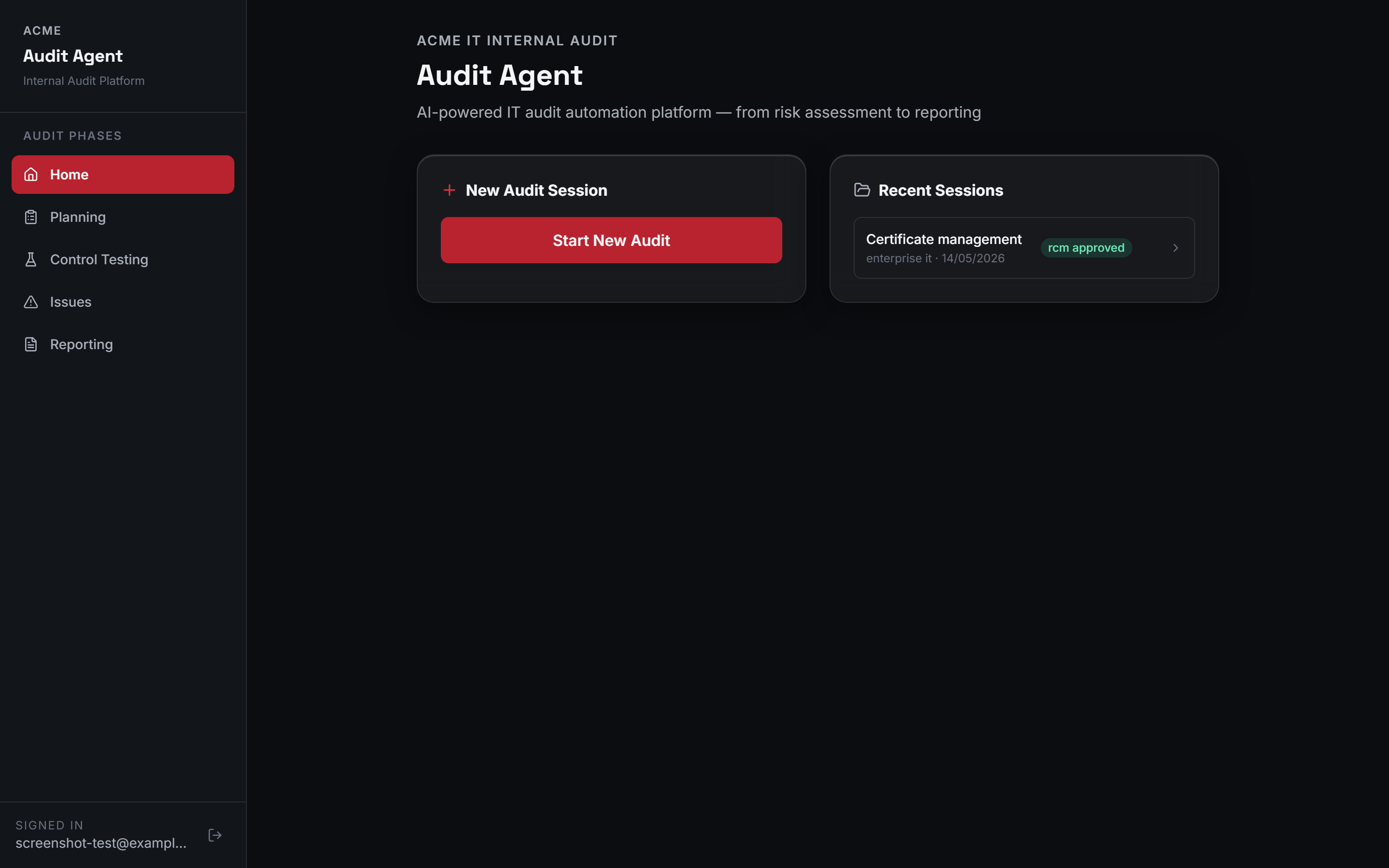
You create a session, pick the audit type and the frameworks (ISO 27001:2022, CIS Controls v8, NIST CSF 2.0, GDPR, the EU AI Act, NIS2, DORA, PCI DSS v4.0 — take your pick, or several at once), and upload whatever the auditee sent you — policies, SOPs, screenshots, last year’s report, whatever format they happened to export it in:
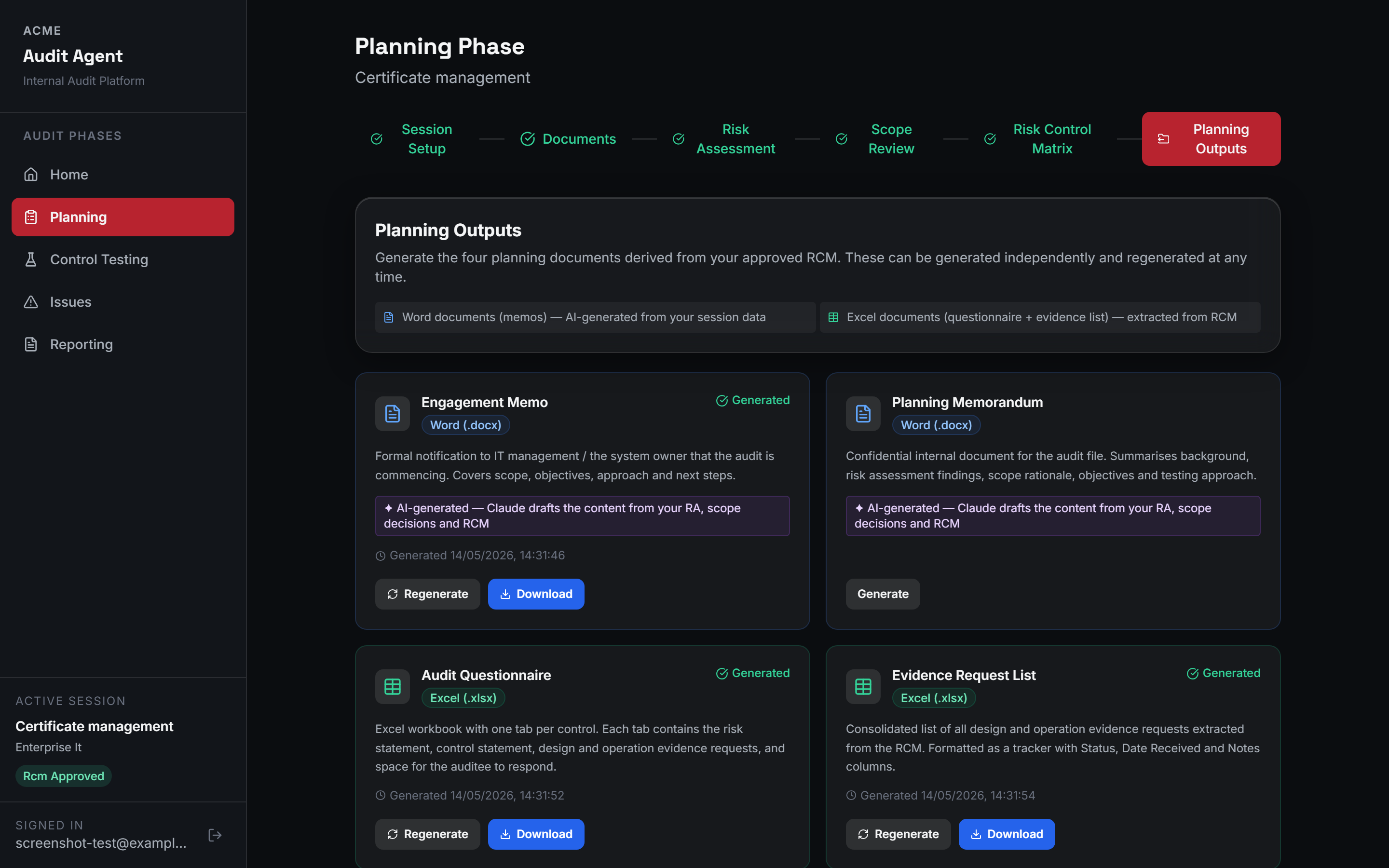
From there it’s a six-step planning walk: session setup, documents, risk assessment, scope review, a Risk Control Matrix of 25 to 40 controls, and finally the planning outputs — an engagement memo, a planning memorandum, a full audit questionnaire, and an evidence request list, all generated from what you’ve already approved. The engagement memo lands directly inside the audit function’s own branded document template rather than as a generic export, and the questionnaire and evidence list come out as structured spreadsheets with an index and dedicated response space per control:
Control testing is where the auditor uploads the auditee’s completed questionnaire and evidence, and the AI reads it against the control description to produce a verdict on design, operation, and overall effectiveness — with a second AI pass reviewing the first one’s work before the auditor ever sees it. When the evidence genuinely doesn’t support a conclusion, the tool says so rather than guessing:
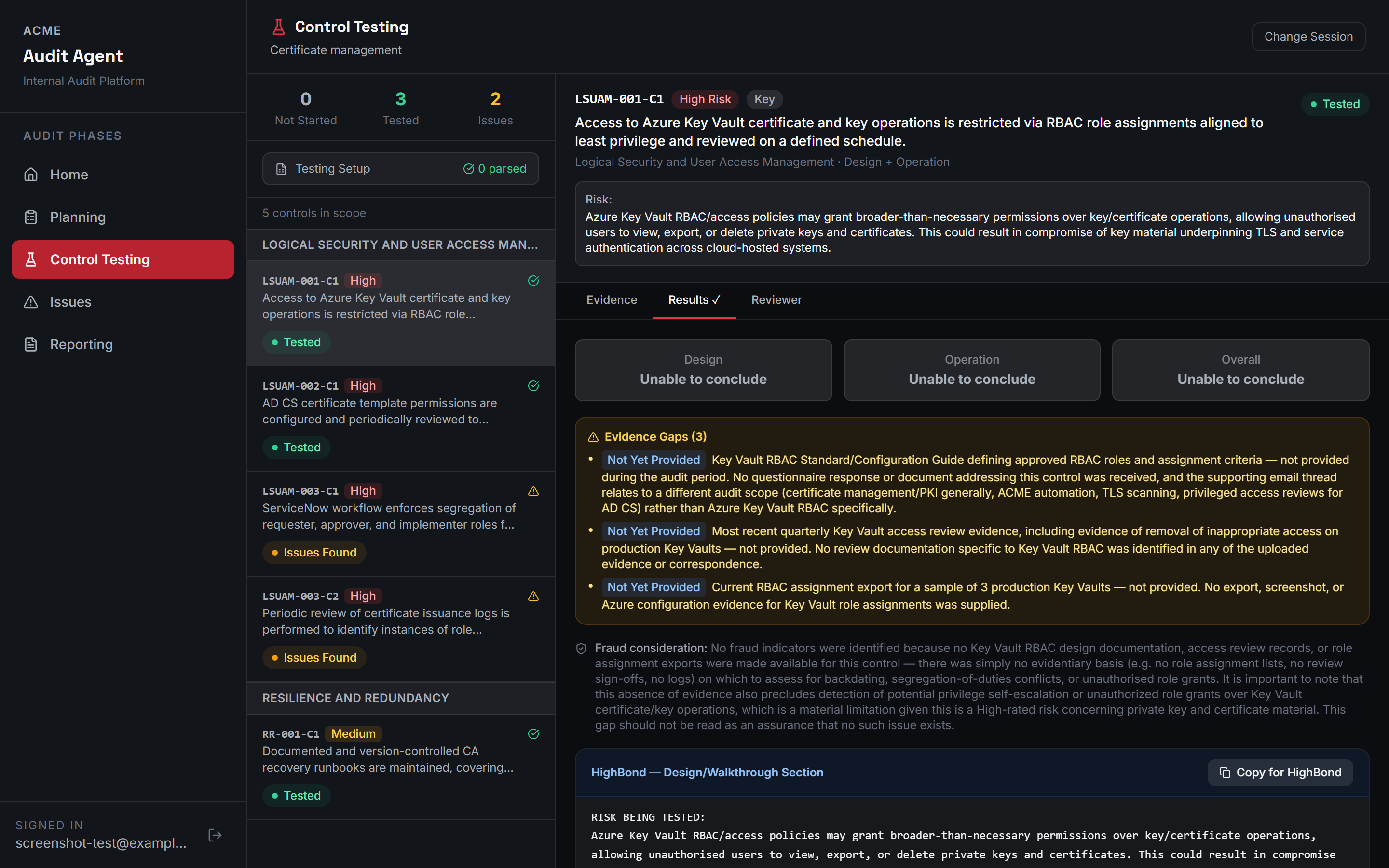
A one-click export formats a control’s conclusion — risk, control, procedure, evidence reviewed, evidence observations, conclusion — into a clean workpaper structure ready to paste into the audit function’s existing GRC platform, rather than forcing a switch away from whatever the team already uses.
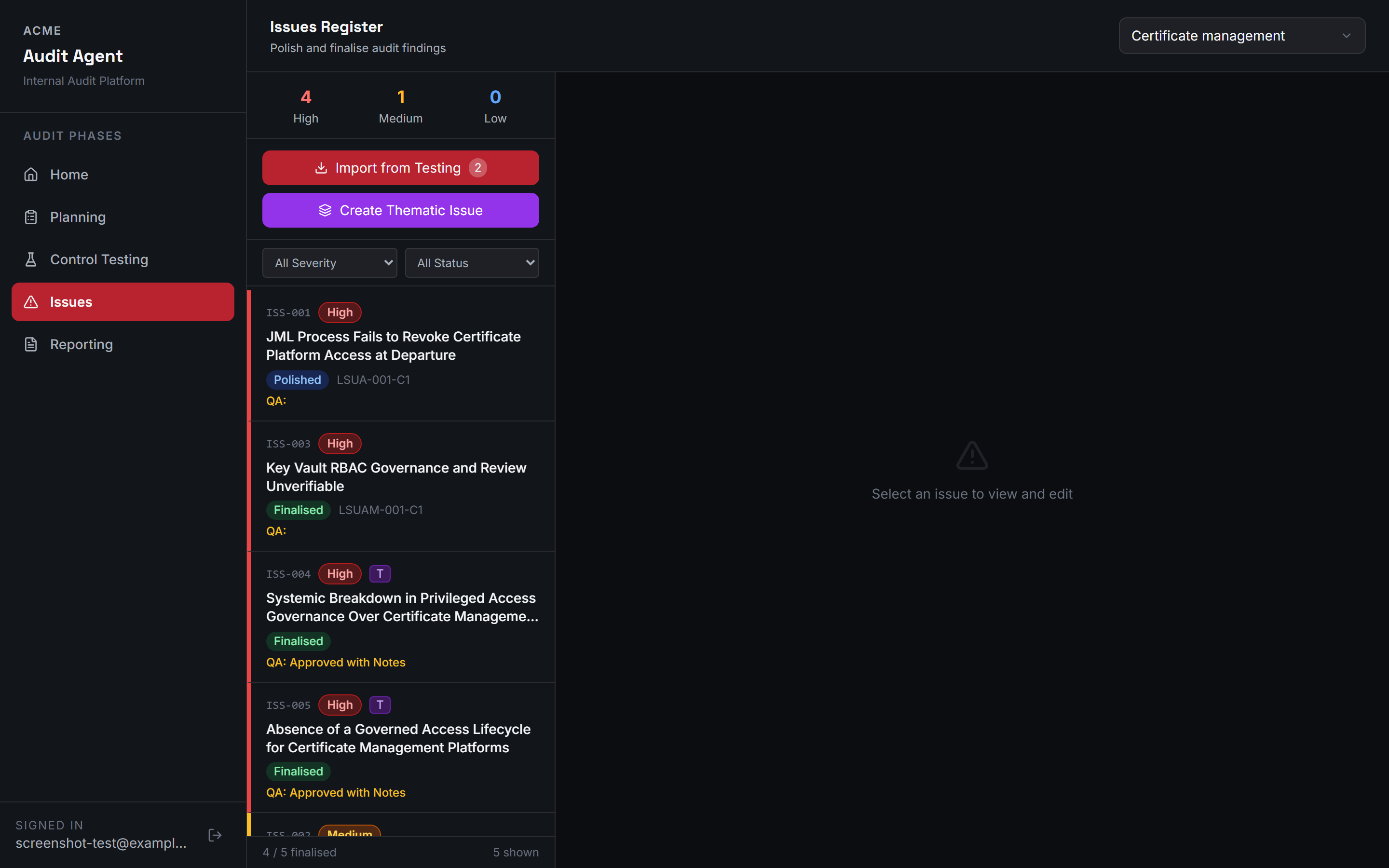
Failed and partially effective controls become draft issues, each one tracked from open to resolved with a severity rating and its own QA status:
And reporting turns the whole session into a signed opinion, moving through a Draft → Agreed Management Actions → Final workflow, with the narrative generated only after the auditor has set the actual opinion, never before:
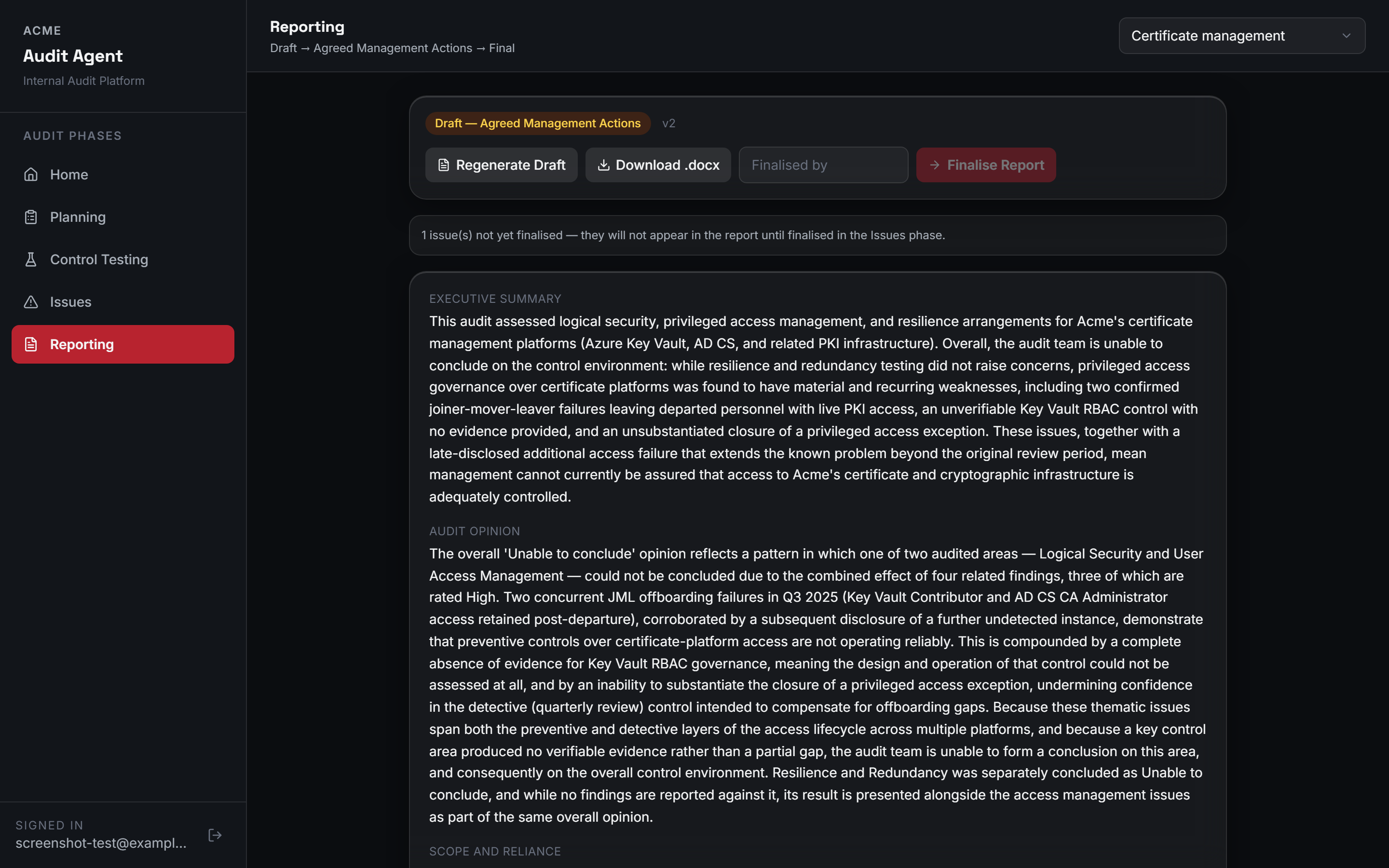
Nothing advances to the next stage without the auditor clicking approve. Not a nicety — the point of the tool.
The build
Built with Claude Code, structured around one hard rule from day one: the AI drafts, the auditor decides, and there’s no button anywhere that skips that. Every stage has a primary AI agent doing the generation work, and a second “checker” agent that reviews the primary output and hands the auditor a structured list of things to look at more carefully — evidence gaps, weak reasoning, conclusions that go slightly further than the evidence supports. It’s not a safety net that removes responsibility from the auditor. It’s a second pair of eyes that happens to be cheap and tireless.
The checker’s advantage isn’t a smarter model, it’s a wider view: the risk and control matrix gets generated one control area at a time, but the checker reviews the entire assembled matrix at once, which is the only reason it can catch a control duplicated across two different areas — something structurally invisible to a pass that only ever sees one area. For engagements that call for a harder second look, a stricter QA mode swaps in a stronger checker model with an explicitly adversarial review instruction, rather than the routine pairing.
The testing prompts also enforce something that matters a lot in real audit work: a written assertion from the auditee is fine for assessing whether a control is designed properly, but it is never enough on its own to conclude a control operates properly. That distinction is spelled out explicitly in the prompt, not left as a disclaimer nobody reads.
The checker isn’t a second opinion generated from scratch — it’s given the same evidence the drafter saw and asked specifically to find gaps in the drafter’s own reasoning, which is a narrower and more reliable task than “review this independently” would be. That’s the same reason a human reviewer works better with a colleague’s draft in front of them than with a blank page. When the auditor rejects a draft, the checker’s specific objection and the auditor’s own rationale both carry into the next attempt, instructed to fix what was flagged and not re-raise what was already accepted. That can’t run forever, though: after two review rounds it stops looping and produces a scored synthesis instead, a QA effectiveness rating with a short rationale built from the round history, so a genuine, stuck disagreement still ends in a defensible record rather than a loop with no exit.
The application itself runs as a self-hosted deployment for a single organisation: a React frontend, a Python API layer, and Postgres as the system of record for every risk, control, test result, and review decision, with the customer keeping the database, the evidence files, the network boundary, and the secrets on their own infrastructure rather than distributed across another vendor’s cloud. Background work — a risk assessment draft, a testing conclusion — runs through a small worker pool reading a queue table directly in that same Postgres instance, deliberately avoiding a separate message-broker layer for a workload that doesn’t need one; the tradeoff is a smaller, easier-to-operate footprint against not (yet) supporting more than one application instance at a time, which is a real, known ceiling rather than an oversight.
Problems & solutions
Symptom: the original chatbot workflow lost context between sessions, and the audit trail became a game of telephone. Diagnosis: conversations don’t persist state, and every retelling loses a little precision. Fix: model the whole audit as one stateful session that holds every document, decision, and approval — nothing gets re-explained because nothing was ever forgotten.
Symptom: early testing drafts sometimes concluded a control “worked” based on nothing but the auditee saying so. Diagnosis: the prompt didn’t distinguish between a policy documented on paper and evidence that it’s actually followed. Fix: make that distinction an explicit, non-negotiable instruction — design can lean on policy, operation needs an actual artefact, or the honest answer is “unable to conclude.”
Symptom: auditees sent evidence in every format imaginable — password-protected PDFs, screenshots, spreadsheets with merged cells, exports from three different systems. Diagnosis: real evidence doesn’t arrive standardised just because you’d like it to. Fix: build a proper ingestion layer up front rather than patch formats in one at a time as they broke something.
Symptom: getting the multi-step workflow to correctly lock and unlock stages turned out harder than writing any of the AI prompts. Diagnosis: I expected prompt engineering to be the hard part; it wasn’t. Fix: treat state management as the real engineering problem it is, and give it the design attention the prompts were originally getting.
Symptom: an auditor rejecting a draft repeatedly could, in theory, send the drafter and checker back and forth indefinitely with no natural end point. Diagnosis: an open-ended disagreement between two AI passes isn’t actually a disagreement that needs resolving forever — at some point it needs to become a documented decision. Fix: cap the review cycle at two rounds, then fall back to a synthesis pass that scores QA effectiveness and states its own rationale, so a genuinely stuck case still produces a defensible, reviewable outcome instead of a loop.
The stack
| Component | Why |
|---|---|
| Python + FastAPI | Backend API and orchestration for every stage of the audit lifecycle |
| React | The session-based frontend, with hard gates between stages |
| Postgres | System of record for every risk, control, test result, and review decision, kept on the customer’s own infrastructure |
| Claude API | Both agents — the primary drafter and the checker that reviews it |
Results
The planning phase used to take the better part of two working days: reading documents, drafting a risk assessment by hand, building the control matrix from scratch, formatting a questionnaire. Now that’s mostly review and approval time, not generation time. Write-ups are far more consistent across controls, since the same prompt template produces the same structure every time instead of however I happened to phrase it that day. And the evidence standard actually gets enforced — the checker reliably flags an assertion-only conclusion before it ever reaches sign-off, which is exactly the kind of thing that’s easy to let slide in a copy-paste workflow and much harder to let slide when something is explicitly asking you to look again.
What’s next
The most useful next step is a direct integration with the GRC tool the output currently gets copied into by hand — the issue format is already structured for it, it’s just not wired up yet. After that, generating the final report as a properly formatted Word document instead of structured text would remove the last manual step in the whole pipeline.