Every apartment fact a landlord needs, in one local file
A local-first operating file for a rental apartment — leases, costs, tax categorisation, and tradespeople in one place.
- Vanilla JavaScript
- localStorage
- OpenAI API
Where this could work for other businesses
Other private landlords with one or two properties are the obvious fit — worth saying once, since it’s exactly who this was built for, then moving to the less obvious reuse.
Small property management companies are a stronger fit than they first look: instead of one subscription dashboard trying to serve every landlord’s portfolio through a shared multi-tenant system, the same local-first, one-file-per-property model could run once per unit under management, keeping each owner’s operating file genuinely separate rather than rows in someone else’s database.
Short-term-let hosts have an almost identical need with different vocabulary — swap “lease status” for “booking status” and the same cost-tracking, tax-categorisation, and tradesperson roster apply directly to an Airbnb-style operation.
More generally, any sole trader or small business that has to categorise expenses against a fixed tax authority scheme — not just the specific working categories this one uses, any jurisdiction’s equivalent — has the same underlying need: itemised costs, a fixed category list, and an explicit “needs review” option for the genuinely ambiguous ones, rather than guessing once a year under deadline pressure.
Strip the property domain away entirely and there’s a second, more structural pattern worth naming: a local-first tool that keeps sensitive operational and financial records on the owner’s own machine by default, with AI participation opt-in and scoped to one document at a time, rather than a cloud subscription holding everything. Any small business wary of handing its full financial history to a SaaS vendor — for cost, for control, or simply because the data is sensitive — has a use for that same shape of tool.
The problem
Being a landlord generates a scattered paper trail almost by accident: the lease sits in one folder, invoices arrive by email or get handed over as a paper receipt, tradesperson contact details live in a phone’s text history, and every category of cost has to be mentally re-sorted into whatever bucket the tax return actually wants. None of that is hard on its own. All of it together, once a year, at filing time, becomes a genuine scramble — reconstructing twelve months of costs from memory and a dozen different places they were scattered across.
The goal
Build one local file that holds an apartment’s entire operating history — leases, costs already tagged for tax, an indexed document trail, and a tradesperson roster — so that filing season becomes filtering and exporting what’s already there, not reconstructing a year from scratch.
What it does
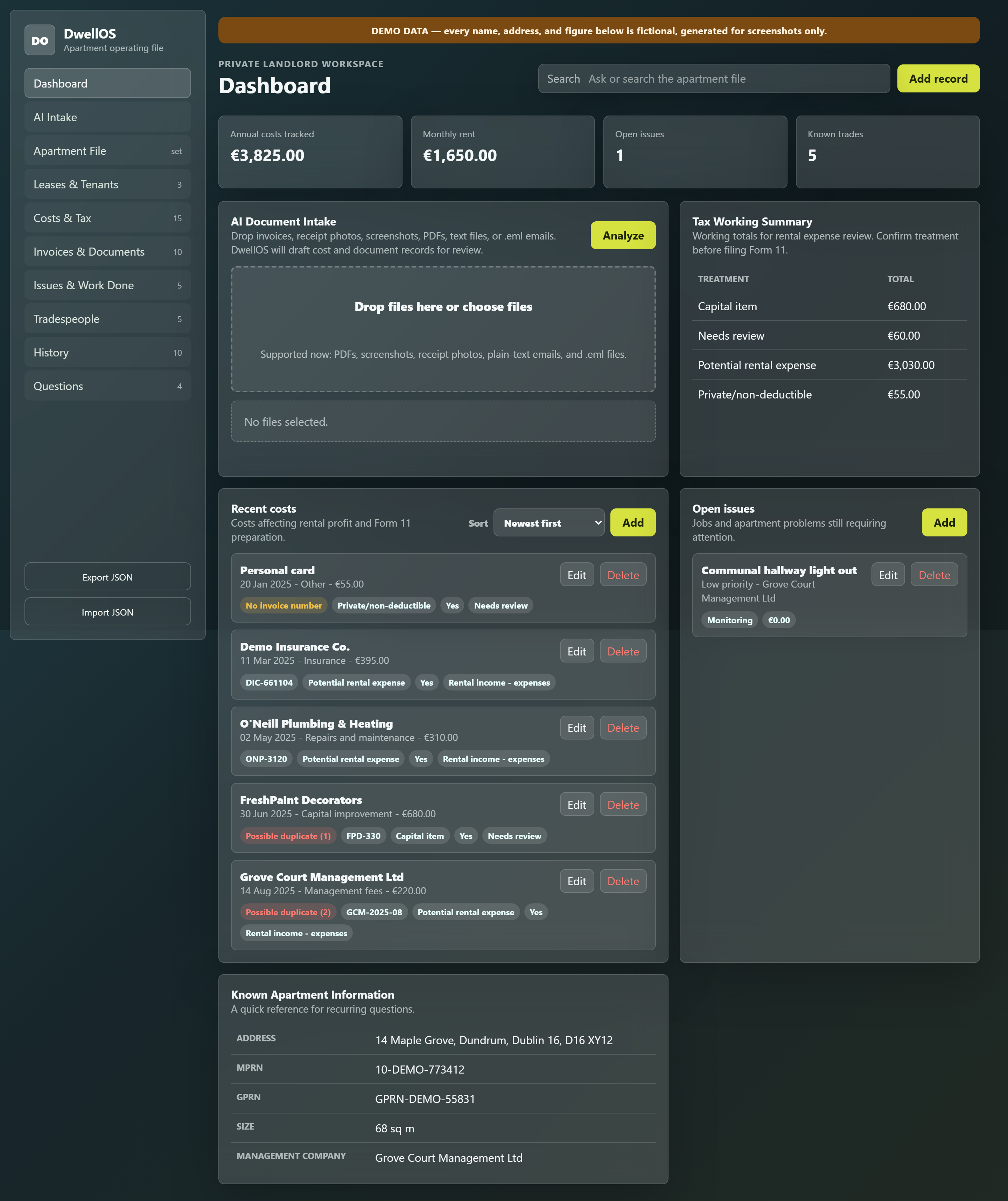
The dashboard gives a summary at a glance — annual costs tracked, monthly rent, open issues, known trades — plus a quick view of recent costs and open issues, so the apartment’s current state is readable in one screen without opening anything:
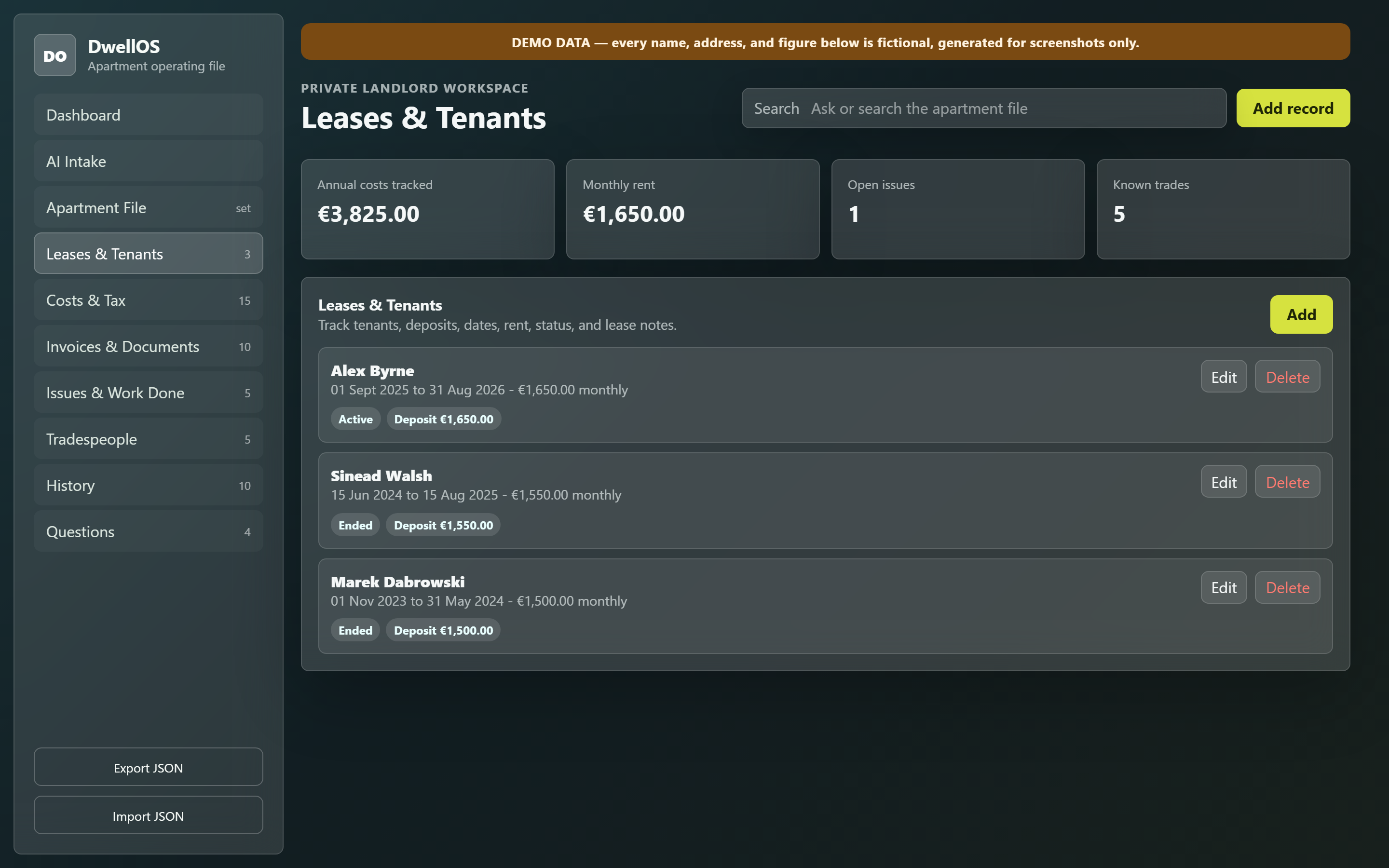
The Apartment File holds the facts that don’t change often — the address, utility meter numbers, BER rating, insurance policy, management company — the kind of thing you’d otherwise have to dig up every time someone asks. Leases & Tenants tracks every tenancy in sequence, current and past, with rent, deposit, and status, so the full rental history of the unit is visible in one list rather than reconstructed from old emails:
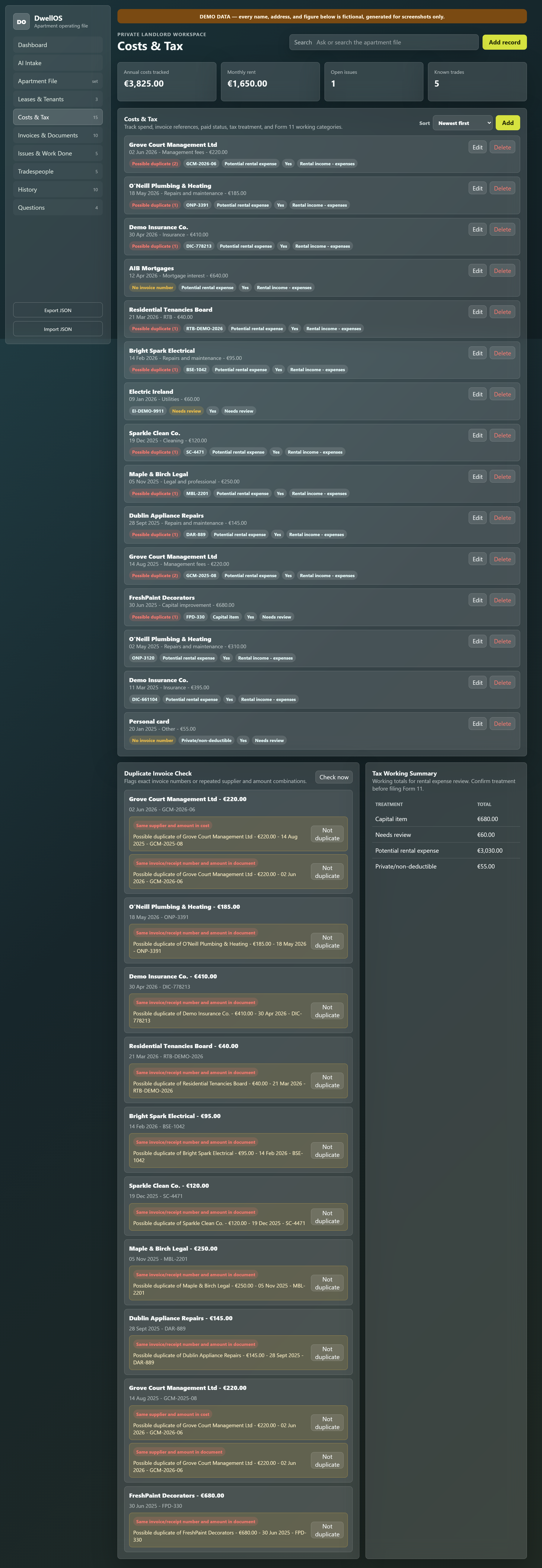
Costs & Tax is the section built specifically around the tax return: every cost gets a category, a tax treatment (a straightforward rental expense, a capital item, private and non-deductible, or explicitly flagged as needing review), and the actual filing box it maps to — so a year’s costs are already sorted the way the return wants them, instead of being sorted once, under pressure, in October. It’s also where the duplicate check actually earns its keep, checking every cost against every other for a shared supplier, invoice number, or amount, and flagging genuine repeats before they’re filed twice:
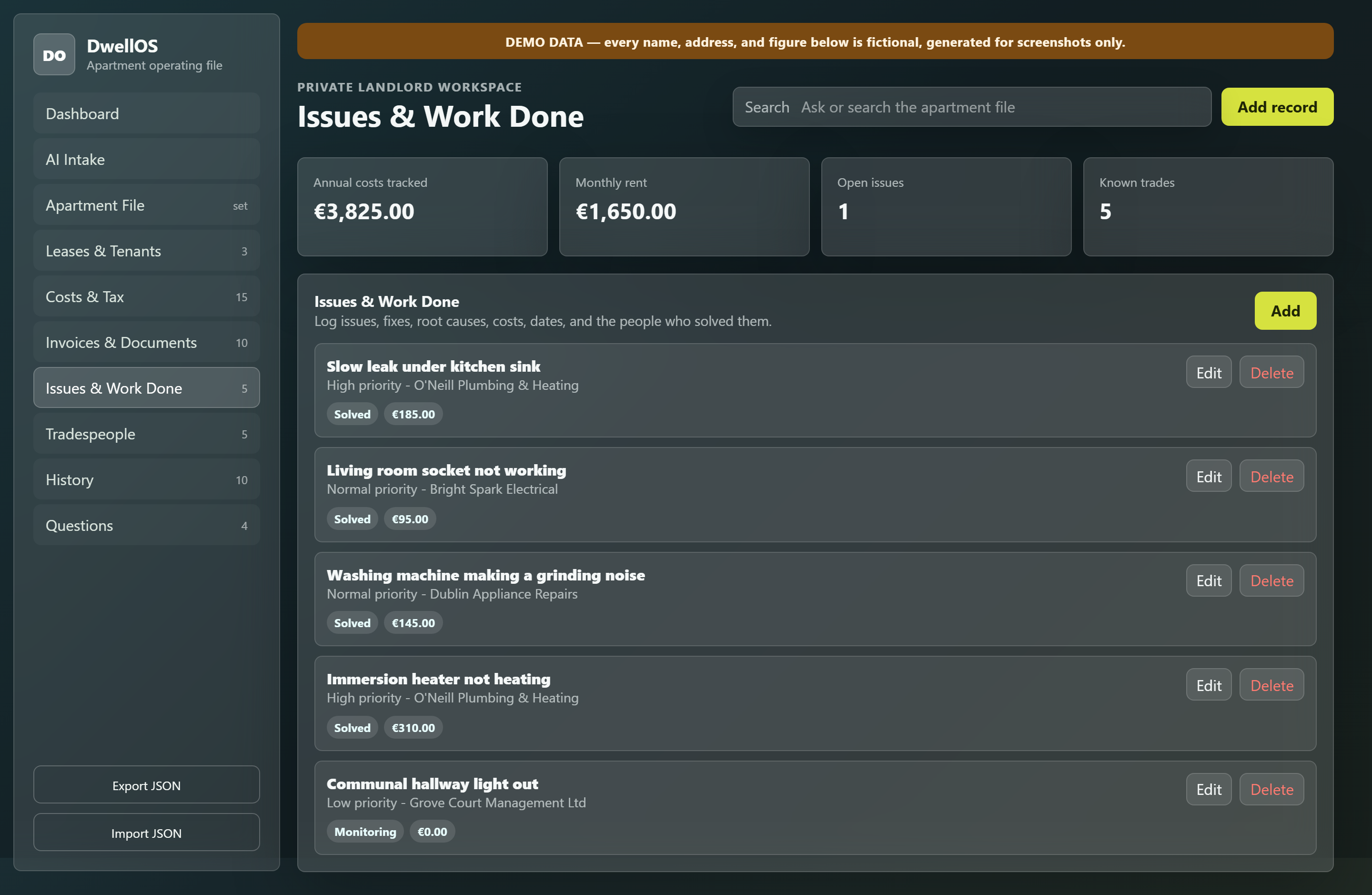
Documents indexes the paper trail itself — what a file is, what it relates to, where it actually lives — without requiring every scan and receipt to be uploaded into the app itself. Issues & Work Done tracks repairs and jobs from open to solved, each one linked to a tradesperson and a cost:
Tradespeople keeps a roster of who did the work with a rating, so “who fixed the immersion heater last time and were they any good” has an actual answer:
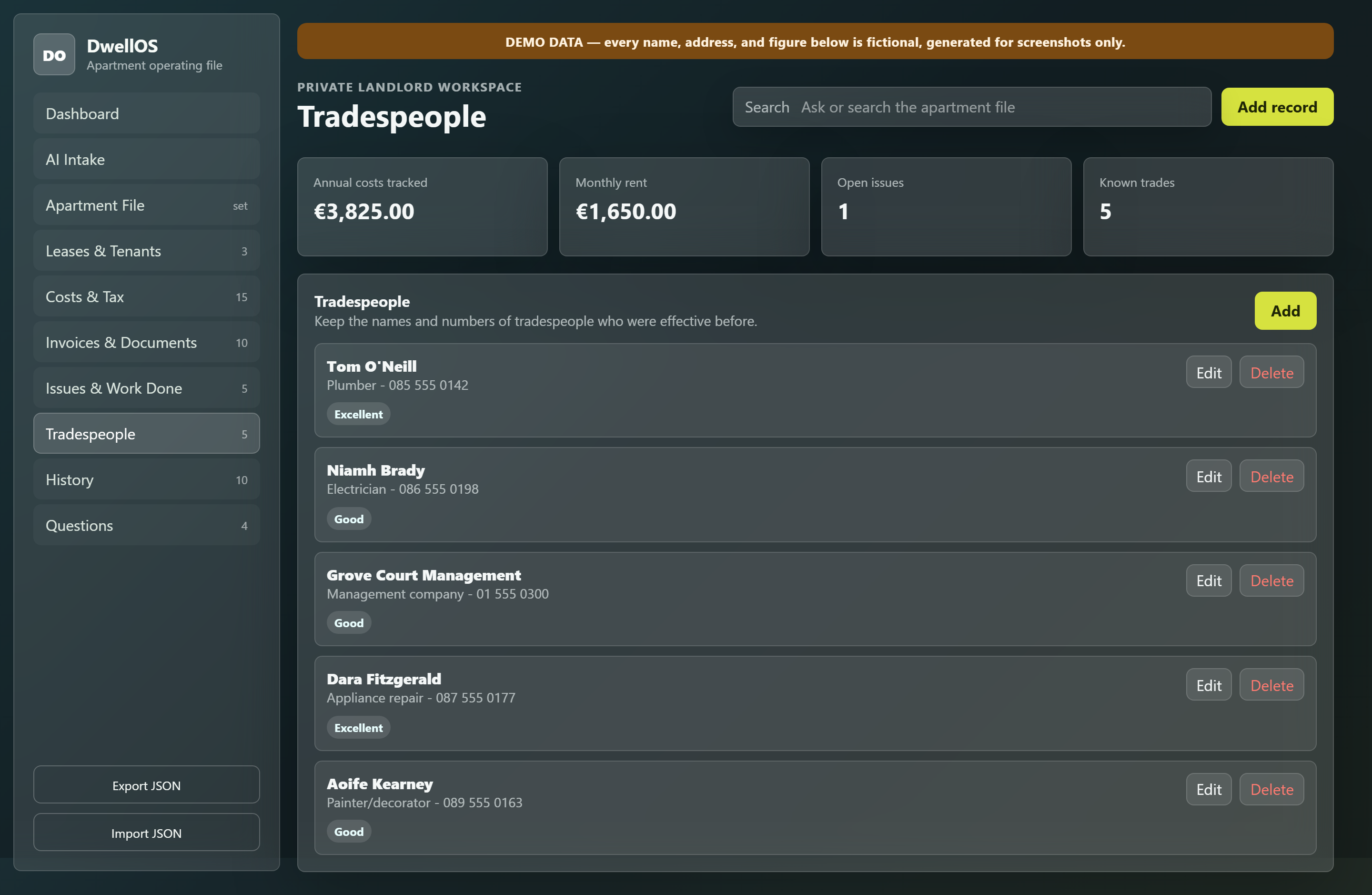
History gives the whole apartment’s timeline — purchase, tenancies, repairs, tax filings — as one continuous record, and Questions holds the recurring things you have to look up every year, answered once and kept. There’s also an AI Intake screen: drop in a document and it attempts to pull out a cost or tradesperson record automatically, rather than typing every invoice in by hand.
The build
Built as a genuinely local-first tool: everything lives in the browser’s own storage, with a plain JSON export and import doing double duty as both backup and the only way data moves between devices — no server, no account, no subscription. That’s a deliberate constraint, not a missing feature: the operating file for a rental property is exactly the kind of thing you don’t want living on someone else’s infrastructure by default. It’s also the one tool on this site running on OpenAI rather than Claude — a genuine, deliberate choice for this specific job, since the AI does one narrow, opt-in task here and the model was chosen for that task on its own terms, not to follow a house style.
AI only enters the picture for document intake, and only when explicitly triggered — dropping in an invoice or a form and asking for cost or tradesperson details to be pulled out of it, rather than an assistant sitting in the background reading everything. It never writes into the operating file directly; it returns a structured proposal that sits in front of me exactly like a draft, one I keep, amend, or discard. The intake step includes duplicate detection, since the same invoice easily gets processed twice — once from an email, once from a photo of the same receipt — matched by invoice number and amount, or supplier and amount, with a user-overridable ignore list for anything that’s a legitimate near-duplicate rather than a real repeat.
The trust boundary is simple enough to explain in one sentence: the operating file stays local, and a chosen document can be sent out for optional extraction. There’s no automated test suite — no framework to write one in for a plain, no-build-step local file — so each release goes through a syntax check and a manual QA pass instead. The one thing genuinely worth citing as rigour here: every field that reaches the page, typed in by hand or extracted by AI, is escaped before it’s written into the page, checked directly against the actual render paths rather than assumed — no injection route through user or AI-sourced content.
Problems & solutions
Symptom: the same invoice, processed twice from two different sources, created two identical-looking cost entries. Diagnosis: a naive duplicate check based on exact text match breaks the moment the same document is re-scanned, re-typed, or arrives in a slightly different format. Fix: match on invoice number plus amount, or supplier plus amount, with a user-overridable ignore list for genuine near-duplicates the matcher would otherwise flag incorrectly — anchored to the transaction itself, not the appearance of the document that carried it.
Symptom: the AI Intake feature needs an API key, and there’s no server to keep it away from the browser. Diagnosis: a genuinely local-first, no-backend tool has nowhere safer to put a credential than client-side storage — that’s a real tradeoff, not an oversight. Fix: treat it as a known, explicitly scoped limitation for this version rather than pretend it’s solved — a safer, proxied approach to that credential is planned as its own piece of work, not bundled in as if it were already handled.
Symptom: not every cost has an obvious tax treatment the moment it’s entered. Diagnosis: some categorisation genuinely depends on judgement an accountant should make, not something to guess at during data entry. Fix: make “needs review” a first-class tax treatment and filing-box option, so an ambiguous cost gets flagged honestly instead of silently mis-categorised.
Symptom: documents are indexed by the app but the actual files aren’t stored inside it. Diagnosis: handling real file storage and preview inside a browser-only tool is a meaningfully bigger piece of engineering than indexing references to where a file already lives. Fix: keep documents as tagged pointers to their real location for this version, and treat in-app storage and preview as deliberate, separate future work rather than something to half-build now.
The stack
| Component | Why |
|---|---|
| Vanilla JavaScript | No framework, no build step — a single local file loads and runs with nothing to install |
| localStorage | Keeps the entire operating file on the owner’s own machine by default, with JSON export/import as the backup and sync mechanism |
| OpenAI API | Used only for the opt-in AI Intake feature — pulling structured cost and tradesperson details out of a dropped-in document |
Results
This one has been genuinely used, not just built and set aside. Real invoices and receipts for a real apartment have gone through it, and the premise it was built to prove — that filing season can be a filter and an export instead of a year reconstructed from memory — is demonstrably true for the data already sitting in it. The connected operating history is the actual value: leases, costs, documents, repairs, and trusted tradespeople are already in context by the time any of them are needed again.
What’s next
The roadmap is honest about what’s still missing: proper in-app document storage and preview instead of reference-only indexing, a safer way of handling the AI Intake credential than storing it client-side, and — the bigger one — support for more than one property, since the current design deliberately scopes to a single apartment’s operating file rather than a portfolio.