A savings target that stopped living in a spreadsheet
Models a career-break plan — savings, property, pension, and a move — all reconciled in one place.
- React
- TypeScript
- Claude API
Where this could work for other businesses
The obvious fit is anyone else planning a similar move — a career break, an early retirement, a relocation for tax residency — worth naming once, since that’s exactly the plan this was built to track, before moving to less obvious reuse.
Financial advisers and coaches are a stronger fit than a generic budgeting app would be: instead of a client’s finances living in a spreadsheet the adviser has to interpret cold at each meeting, the same reconciled view — savings, property, pension, a scenario-modelled drawdown — becomes a shared reference both people are actually looking at, updated between sessions rather than reconstructed at the start of each one.
Anyone managing a rental property alongside a savings goal has an immediate use for the property-plus-drawdown combination specifically — a landlord who’s also trying to hit a number needs to see net rental income and portfolio drawdown in the same place, not as two separate spreadsheets that never talk to each other.
More generally, the “several real numbers that all move together” problem shows up anywhere a plan has more than one moving part with a shared deadline — a business tracking runway alongside a fundraising goal, a household tracking a mortgage payoff alongside a separate savings target. Strip the retirement-planning domain away and the underlying mechanism is: reconcile several interdependent numbers against one target date, model best/worst/likely scenarios rather than a single point estimate, and let an AI advisor answer questions with the full current picture injected as context rather than guessing. That combination — real data, scenario modelling, and a context-aware assistant — is useful anywhere a plan has multiple moving parts and a deadline.
The problem
Planning a genuine life change — a career break, a move, a change in tax residency — means tracking several things that all move independently and all matter to the same underlying question: are we actually going to hit the number, by the date we’re aiming for? Savings sit in several accounts across two people. Two rental properties each have their own mortgage, rent, and expenses, taxed differently depending on residency status. A pension grows on its own schedule. None of that fits in a single spreadsheet cell, and a plan that only gets checked in occasionally, by hand, drifts out of date exactly when it matters most — right before a big, hard-to-reverse decision like resigning from a job.
The goal
Build one dashboard that reconciles every moving part of the plan — savings across multiple accounts and two people, two rental properties, a pension, and a modelled drawdown at the destination — against a single target date and cash figure, with enough scenario modelling to answer “what if the market has a bad few years” honestly instead of optimistically.
What it does
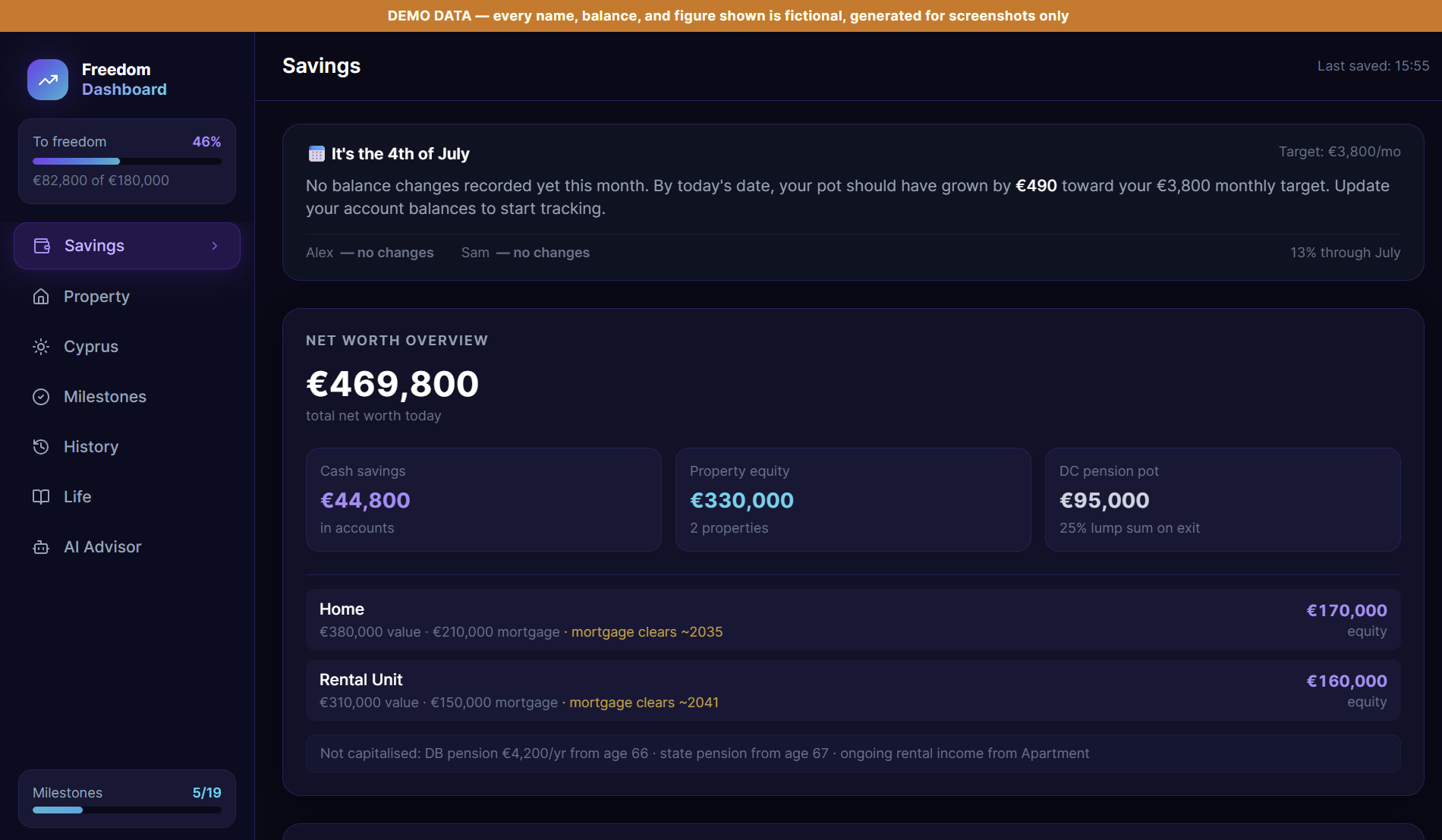
The Savings tab tracks progress toward a cash target across both people’s accounts, split between straightforward savings and investment accounts, with a running percentage toward the goal, a monthly nudge showing whether this month is on pace, and a full net-worth breakdown across cash, property equity, and pension:
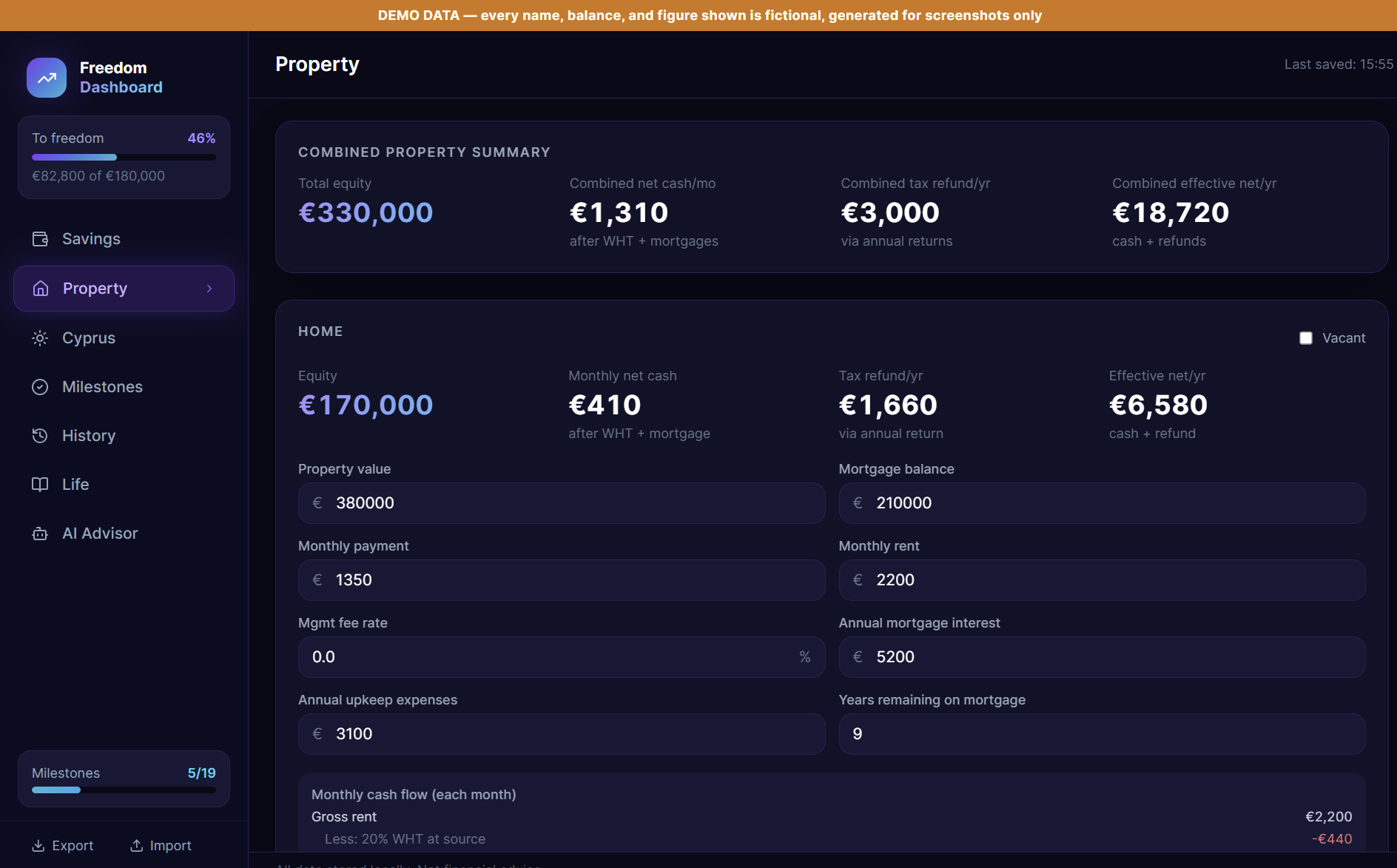
The Property tab handles two rental properties, each with its own mortgage, rent, and expenses, calculating net rental income after the tax treatment that applies to a landlord who’s no longer resident in the country the property sits in — a genuinely fiddly calculation involving withholding tax and separately claimable deductions, done once correctly rather than re-derived by hand every time it’s needed:
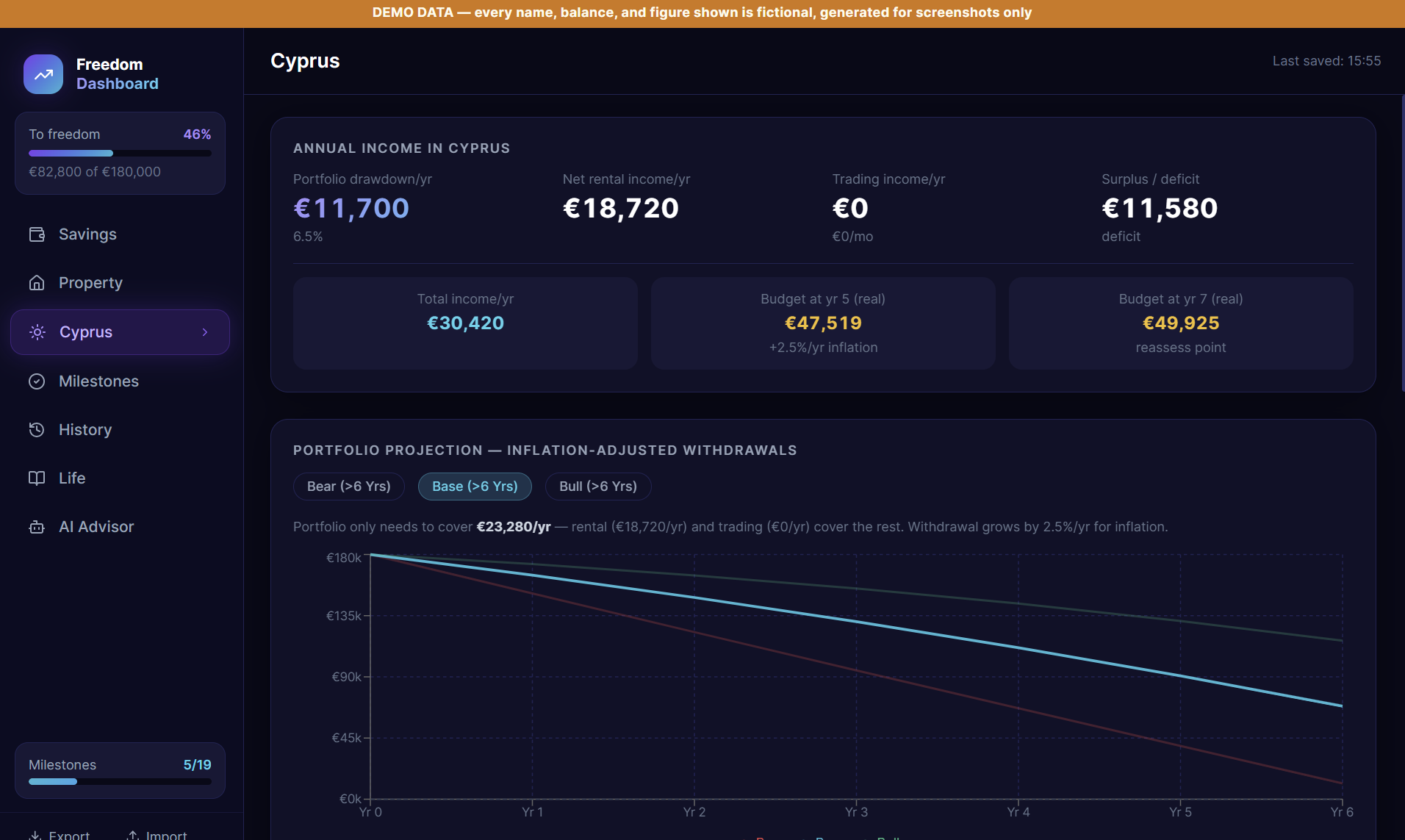
The Cyprus tab (built around a specific relocation, but structurally a general portfolio-drawdown model) projects the invested capital against three scenarios — a bad run of markets, an ordinary one, and a good one — against a fixed annual budget built up from its own itemised line items, so the plan’s viability is expressed as a range, not a single optimistic number:
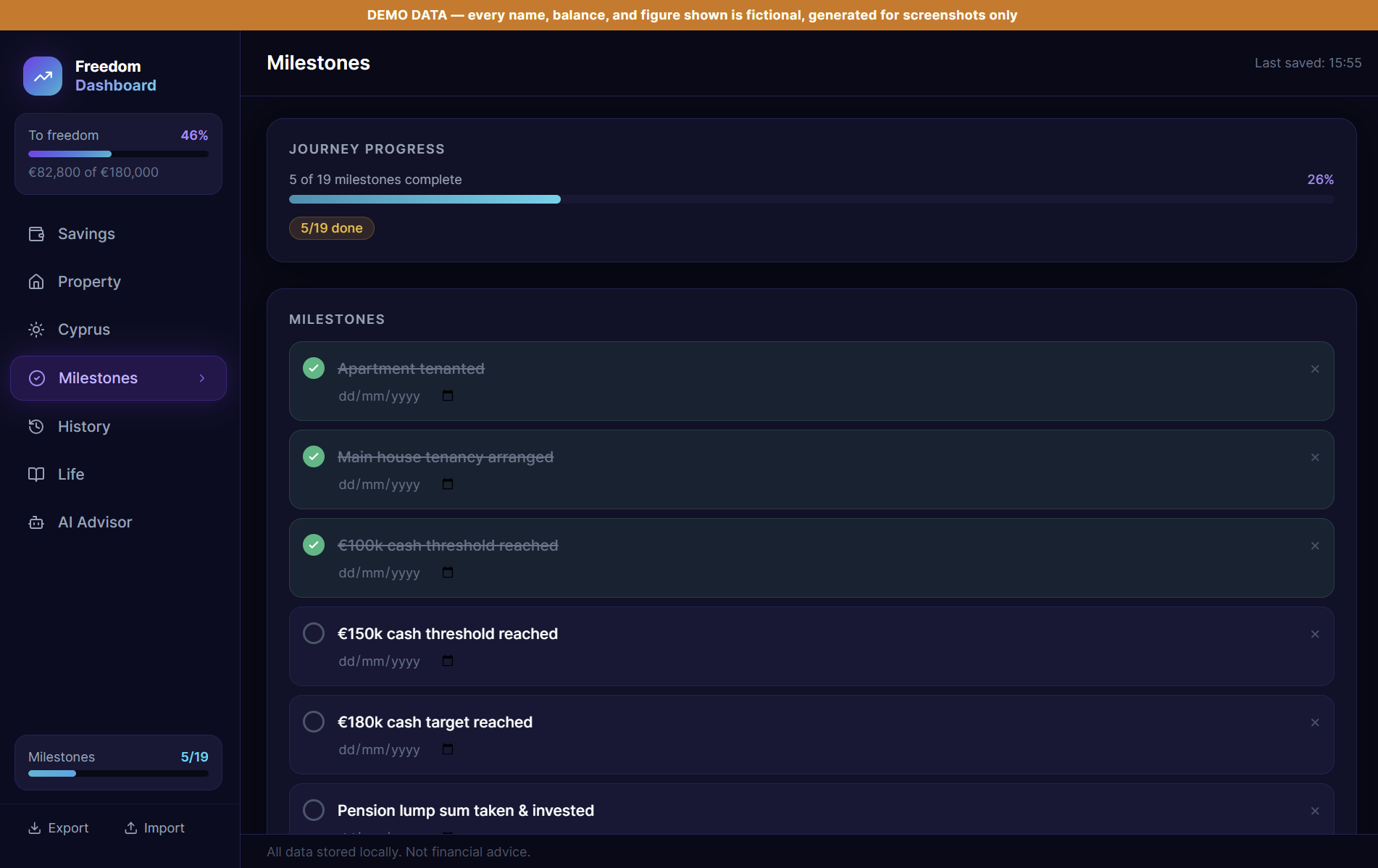
Milestones track the actual sequence of steps a move like this involves — tenancy arrangements, savings thresholds, resignation, tax registration in both jurisdictions — as a simple done/not-done checklist rather than something held in memory:
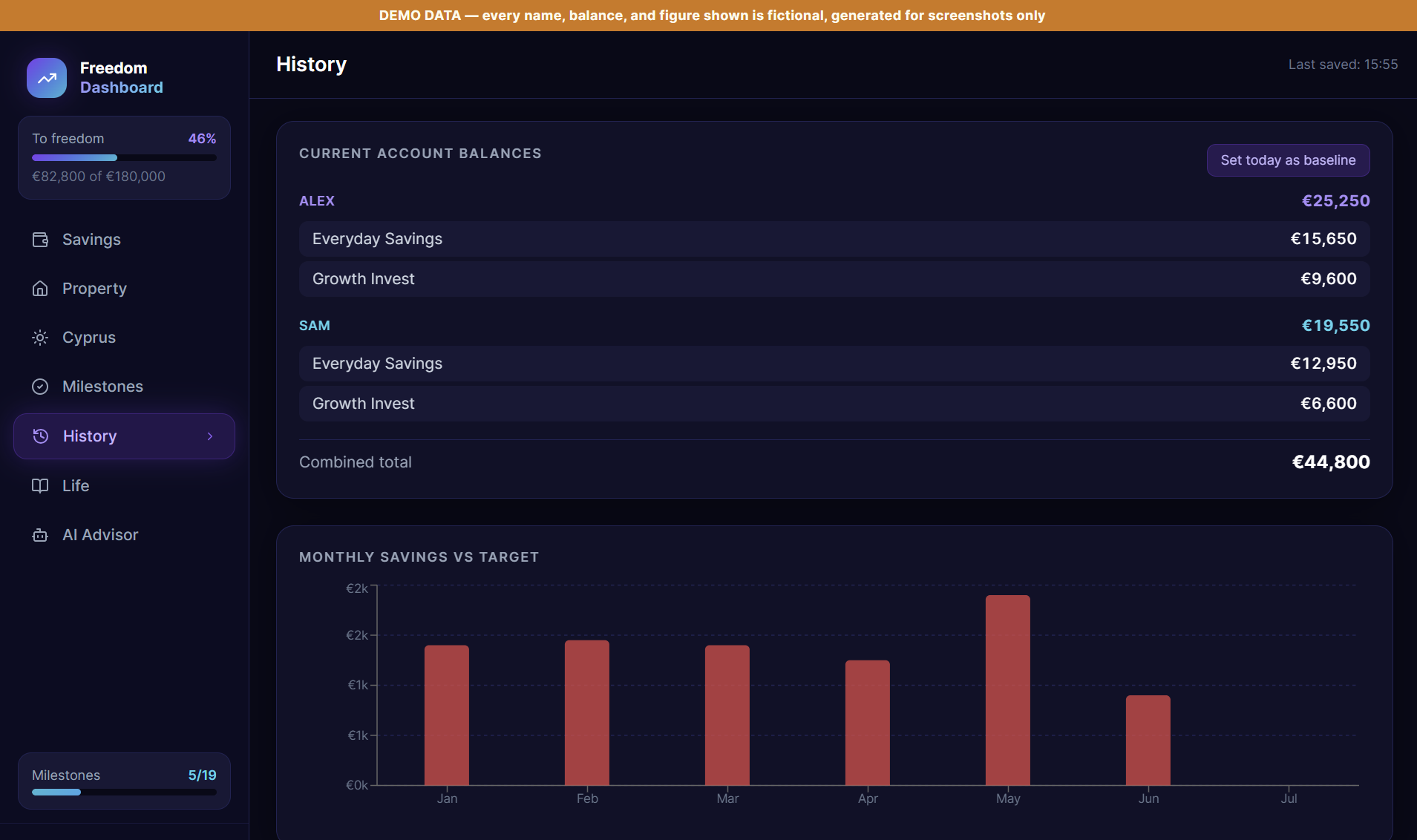
History logs every account balance change automatically, splitting genuine new savings from market movement on investment accounts, so “did we actually save more this month, or did the market just have a good month” has an honest answer:
A Life tab holds a manifesto and a running journal — the emotional side of a plan like this is real, and worth anchoring alongside the numbers, not treated as separate from them. And an AI Advisor tab answers questions with the entire current financial picture injected as live context, rather than a generic chatbot guessing at numbers it’s never seen.
The build
Built with Claude Code, and deliberately local-first: everything lives in the browser first, with a lightweight background sync to a single JSON file on disk so the same plan is visible from more than one device without needing a real backend, a database, or a cloud account holding the data.
The AI Advisor is the one place a third party sees any of this, and it’s handled narrowly on purpose: a fresh, complete snapshot of the current financial picture is assembled and injected into the system prompt on every question, rather than the model working from a stale summary or vague partial context. It’s explicitly framed as planning support, never advice — a clear, permanent boundary rather than a disclaimer bolted on afterward. The migration logic that merges saved data with new default fields on every load is a small but important piece of engineering: as the data model has grown, older saved data is deep-merged field by field against current defaults, so nothing gets silently dropped or reset when a new feature adds a field that older saved data never had.
Problems & solutions
Symptom: distinguishing genuine new savings from a good or bad month in the markets was impossible looking at raw balance changes alone. Diagnosis: an investment account’s balance moves for two completely different reasons — money going in, and the market doing whatever it does — and conflating them makes the savings rate meaningless. Fix: record every balance change with an explicit contribution figure separate from the total change, so the deposit and the market movement are always visible as two different numbers, never blended into one.
Symptom: adding a new field to the data model risked silently breaking anyone’s already-saved data, either losing it or leaving the new field permanently blank. Diagnosis: a flat overwrite of old data with new defaults loses real values; a flat merge the other way never picks up new fields at all. Fix: a deliberate, field-by-field deep merge on load — saved values always win where they exist, new default fields fill in only where nothing was ever saved.
Symptom: rental income for a landlord who’s moved abroad isn’t simply rent minus mortgage — it involves a withholding tax and a separately claimable set of deductions that don’t net out the way a naive calculation would assume. Diagnosis: treating it as ordinary income maths would have understated what’s actually recoverable. Fix: a dedicated, carefully checked calculation kept in its own place and reused everywhere rental income needs to appear, rather than re-derived inline wherever it’s used.
Symptom: hardcoded personal figures had crept directly into two places in the source — a fallback default and an AI system prompt — neither of which should have carried real numbers or names as literal text. Diagnosis: convenience during initial development (“just use the real numbers, it’s only ever going to be me using this”) left sensitive figures sitting in plain source code rather than only in the actual saved data file. Fix: replace the hardcoded fallback with clearly fictional figures, remove a hardcoded income figure that nothing in the data model actually needed, and route every display name through a single switch that resolves to fictional names whenever the app is opened for a demo.
The stack
| Component | Why |
|---|---|
| React | A component per financial area (savings, property, drawdown, milestones, history, life, advisor) keeps a genuinely complex plan navigable |
| TypeScript | A data model this interconnected benefits enormously from the compiler catching a mismatched field before it ever reaches the browser |
| Claude API | Powers the AI Advisor — answering planning questions with the full current financial snapshot as context, never with standing access to make changes |
Results
The plan went from something reconstructed by hand, occasionally, under time pressure, to a single view that’s always current — savings, two properties, a pension, and a modelled drawdown all reconciled against the same target date in one place. The scenario modelling changed the nature of the confidence in the plan: instead of one optimistic number, the bear-case projection is sitting right next to the base case, which is a much more honest way to decide whether a plan is actually ready to act on.
What’s next
Live account syncing is the natural next step — balances are currently updated by hand, which works but adds lag and the occasional typo. Beyond that, the deeper opportunity is making the plan itself more dynamic: letting the AI Advisor flag when a real change (a rent increase, a market move) meaningfully shifts the projected timeline, rather than waiting to be asked.